Vision language models for image classification without training

10 min read12.3.2026
The Challenge
Sometimes the most interesting engineering solutions come from simple frustration. This is a small but meaningful challenge to solve.
I had purchased a fairly large list of icons that had no meaningful filenames. Their filenames were just ascending numbers. If I wanted an icon for a specific purpose, say a “flower” icon or a “zoom in” icon I needed to search visually one by one. This is time consuming and it would be much better if the icons had meaningful names, so I could just do a filesearch. Therefore, I thought about how to solve my problem as simply and quickly as possible. One of the low effort solutions that came to my mind was to use some small VLM (vision language model), which I had used previously on project Foocus to generate captions for scenes. Icon labeling is, after all, a task similar to scene caption.
Just a few years ago, you would have to train a custom computer vision model for this, but with the rise of LLMs and continuous development of Multimodal LLMs (MLLMs), which is a general name for LLMs that also supports input other than text, you can just describe the task, and get results without any extra training. You may already know that if I upload an icon to ChatGPT it will give me a label. It works but is inefficient. So the question was how can I get labels for thousands of files at one time?
If I run a much smaller model on my laptop, I don’t even have to send the data to the cloud.
Setup
Since my icons were purchased, I wanted to process them locally. I therefore chose one of the smaller VLMs that I can run straightforward with transformers library on my notebook with 4GB GPU - Qwen3VL-2B.
If you have a larger GPU, with 8GB memory or more you can use larger Qwen3VL-4B - the labelling process with it will be slower but you might get more relevant labels for some specific icons. In other words, choosing a smaller VLM model might still be relevant even if you have a GPU with larger memory, as a smaller model will run on it much faster.
After the model was chosen, I created a simple prompt “Provide me with a label that best describes the given icon (1-3 words)”, picked 10 random images from the dataset and asked the VLM to label those.
For 9/10 icons I was happy with the given label. The last of the set exposed an interesting edgecase. I was not happy with the label for magnifying glass with the plus symbol in it, which clearly represents “zoom in” or “zoom” action, so I would expect that to be present in the label, but the label from the VLM was “search_icon”. This was not specific enough, there already was another icon here also labelled as “search_icon” and it was the magnifying glass without anything extra.
The small plus symbol inside the magnifying glass is a small change but big enough in meaning of the icon. I wanted the VLM to pick this. So I decided I needed to test more prompts and evaluate how satisfied I am with the labels they give.
Next I labelled the 10 images and realized some of them could have more accurate names. Like “save_icon”, which was a floppy disk so labels like “storage media” and “floppy disk” would also be acceptable.
I decided that for each icon I will create a.syn file with a list of acceptable labels. In the best case I would like for the VLM to answer with the most precise name, but also when it answers with something that could be used as a tag during semantic search, I did not want it to count as a bad answer.
So I designed the.syn file with following format (example with concrete entries):
# precise
magnifying glass zoom in
magnifier zoom in
zoom in
# precise must include
zoom
# synonyms
magnifying glass
look
examine
locate
magnifier
focus
magnifying glass with plus sign
magnifying glass with plus
magnify
view
inspect
close up
Sections explanation:
- precise section includes the most concrete names for the icon I would subjectively pick
- precise must include section includes words that can be part of the labels (substrings) provided by VLMs. If the label provided by VLM contains any of this word, it can be considered as a hit in some tests
- synonyms section simply includes synonyms - words that could be used as tags etc.
Tests
How do I know if the labels the VLM is suggesting are any good?
And how do I choose the right prompt to get the best results?
There are many ways to formulate the task (prompt engineering), and I needed strong evaluation metrics to see what prompts align the most with the.syn files I created for the small sample of icons.
Therefore I decided to conduct multiple tests, divided into 2 groups.
First group - more_strict allows only VLM labels that match words from section precise.
Second group - more_open allows matches from all sections.
For each group I then conducted “subtests”, so that I have more metrics to choose the best prompts.
Here are the extra tests:
- More Open Benchmark (more_open)
- must_include_rescue - this test can increase success rate by additionally checking if any prediction contains a word from the precise_must_include section as a substring.
- min_3_matches & min_5_matches (min k matches) - prompt passes this test only if k or more predictions matches the acceptable labels
- hit_rate - percentage of VLM predictions that match acceptable labels. This one is more of an interesting metric than the test
- top_3_match & top_5_match (top k match) - prompt passes if any of the first k predictions matches a synonym.
- top_3_match_rescue & top_5_match_rescue (top k match with rescue extension) - prompt passes if any of the first k predictions matches a synonym or if any of the first 3 predictions is a substring of any synonym.
- first_word_exact - first label outputted by VLM must be a synonym
- first_word_rescue - first label outputted by VLM must be a synonym or a substring of any synonym
- synonym_position - reports average position where a synonym match appears (lower is better), by tracking the first synonym match per icon. If there is for some icon and prompt no synonym match, it adds tracks length(VLM_labels) + 1
- More Strict Benchmark (more_strict)
- must_include_rescue - same as for more_open test
| Test ID | Type | What It Measures | Key Output |
|---|---|---|---|
| more_open | Benchmark | Any prediction matches precise/synonyms/must_include | accuracy |
| more_strict | Benchmark | Any prediction matches precise only | accuracy |
| must_include_rescue | Extension | Rescues failures via substring check | pass_rate |
| min_3_matches | Threshold | ≥3 predictions match (when ≥3 given) | pass_rate |
| min_5_matches | Threshold | ≥5 predictions match (when ≥5 given) | pass_rate |
| hit_rate | Ratio | % of predictions that match | avg_value (0-1) |
| must_include_check | Substring | Any prediction contains must_include token | pass_rate |
| top_3_match | Top-K | Match in first 3 predictions | pass_rate |
| top_3_match_rescue | Top-K | Match in first 3 (+ substring rescue) | pass_rate |
| top_5_match | Top-K | Match in first 5 predictions | pass_rate |
| top_5_match_rescue | Top-K | Match in first 5 (+ substring rescue) | pass_rate |
| first_word_exact | First-Word | 1st prediction exactly matches | pass_rate |
| first_word_rescue | First-Word | 1st prediction matches (+ substring rescue) | pass_rate |
| synonym_position | Position | Position of first match | avg_value (lower=better) |
Tested prompts
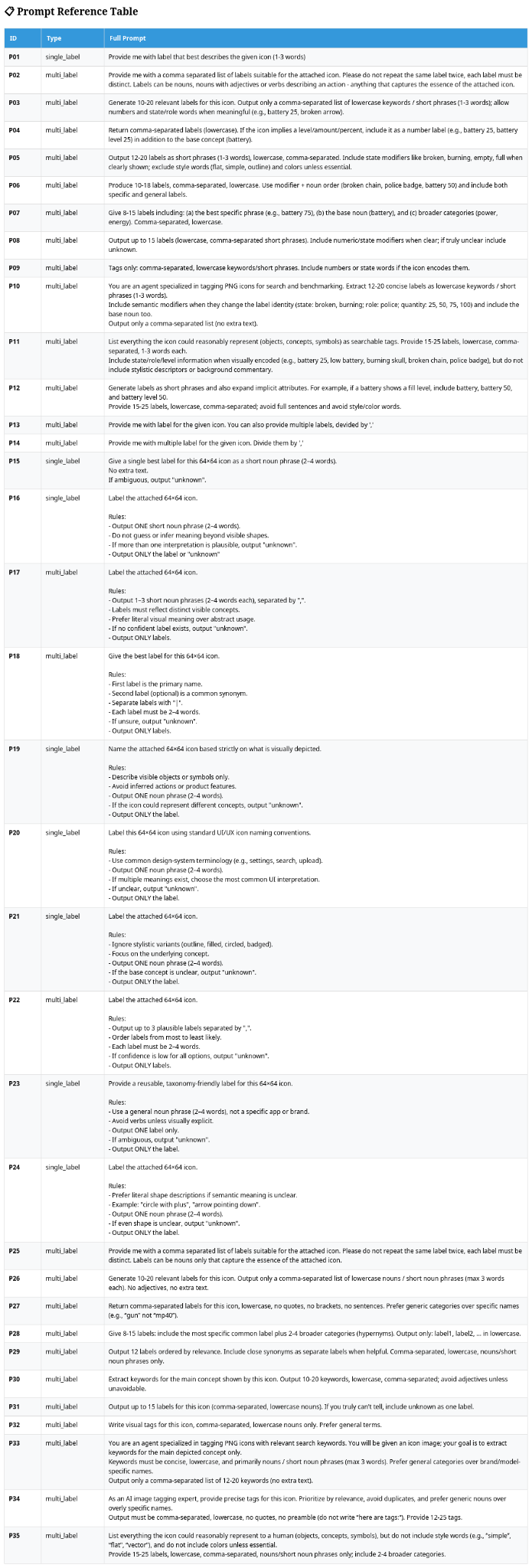
In the table below you can see the used prompts with their type and ids (the results further down are used as ids for clarity). Prompts are either type single_label - VLM is expected to answer here with one label only, or multi_label where the VLM is prompted to provide multiple labels, separated by comma.
Results
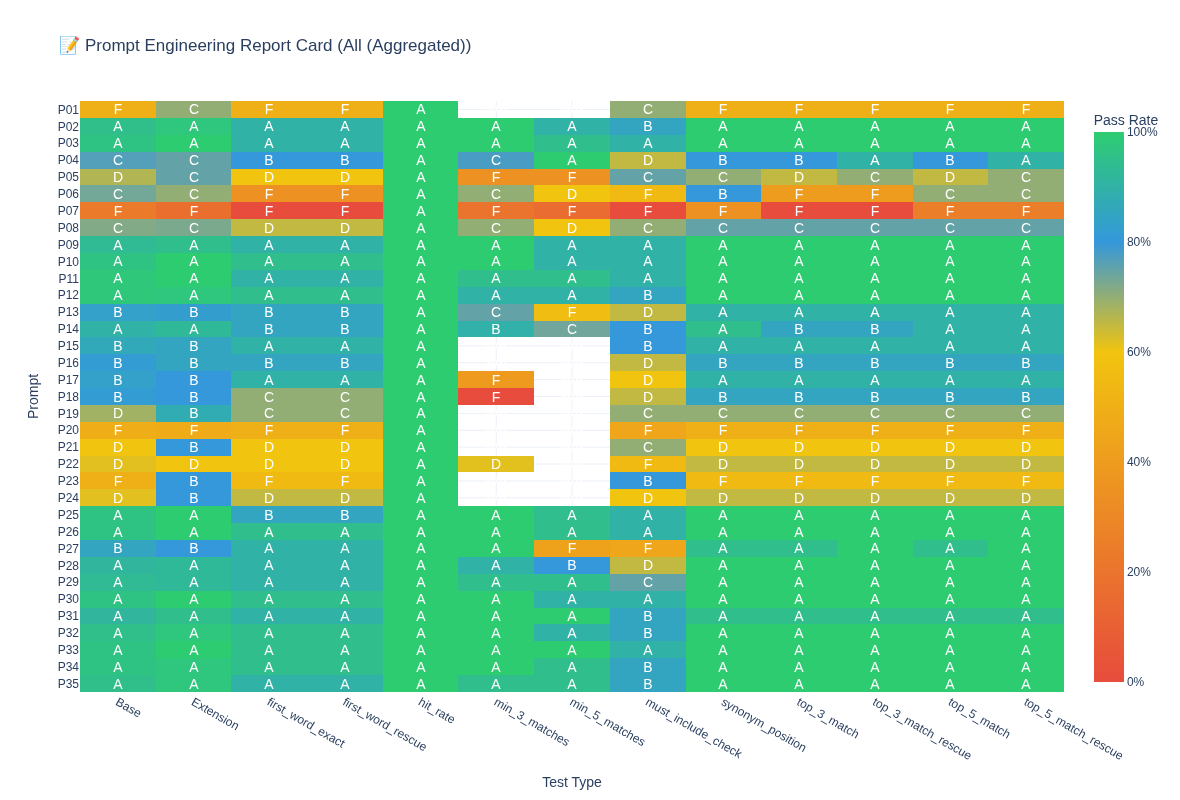
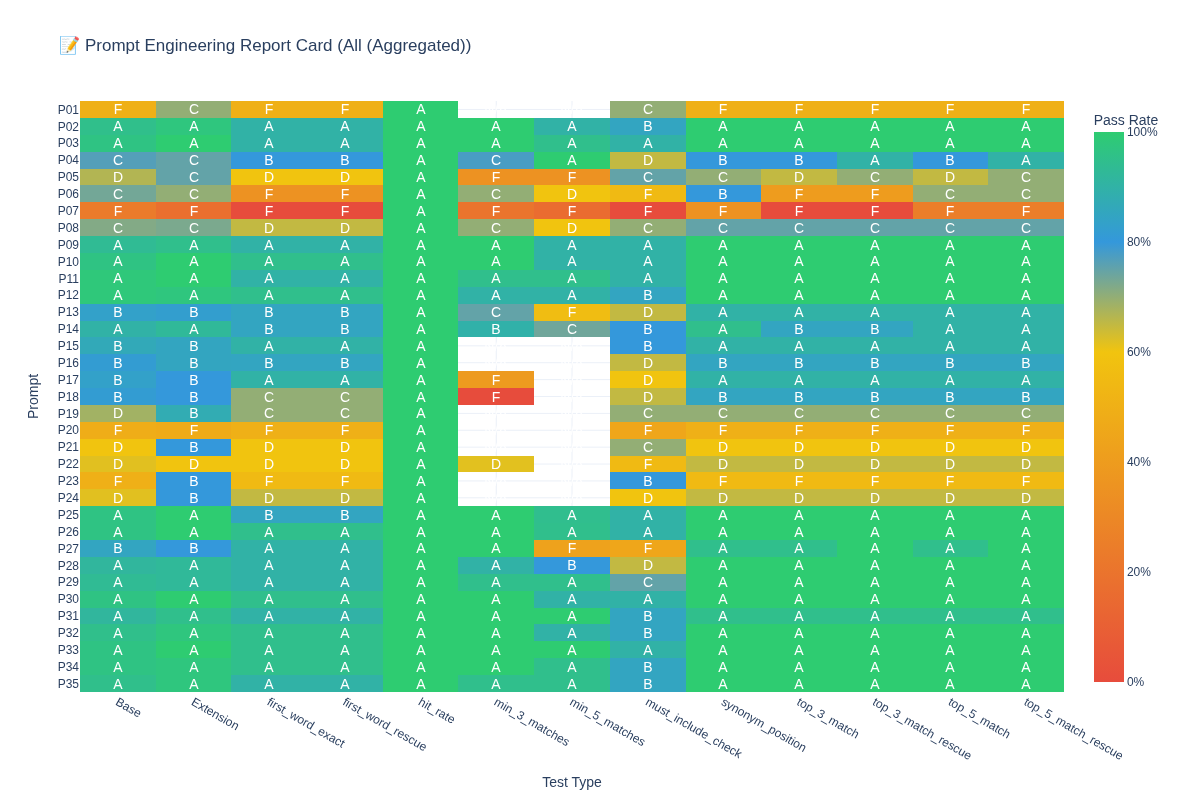
The results below, in the form of grades per test, show visually which tests prompts passed/failed.
The Base and Extension columns show aggregated/combined results for more_open and more_strict tests without and with the “must include” extension. The more green the row is, the better the given prompt performed. In column hit_rate each prompt has an A because it had at least 1 hit but that didn’t end up being meaningful.
When you look at other tests, however, they are the most relevant. There might be an occasion where in one test a prompt scores better than the others, but in another test it fails miserably. It is hard to tell which test is the most reliable by looking at the table, but we can clearly see which prompts didn’t work so well- the ones with F grades.
Winners and losers
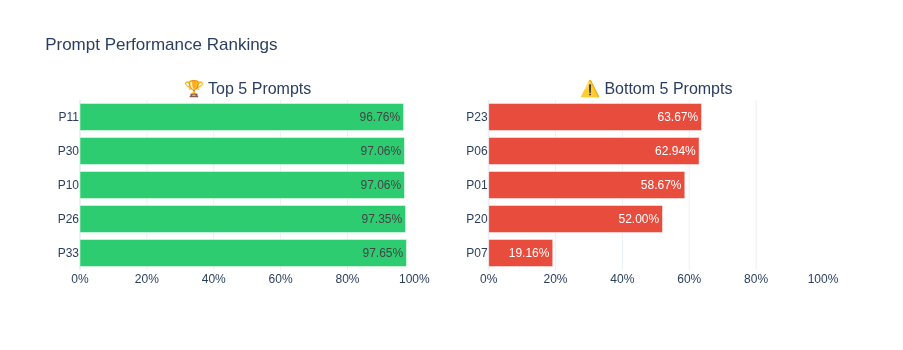
To find out the best prompts, I calculated the average grade (by percentage) and here are the best 5 prompts and worst 5 prompts.
Final strategy for labeling
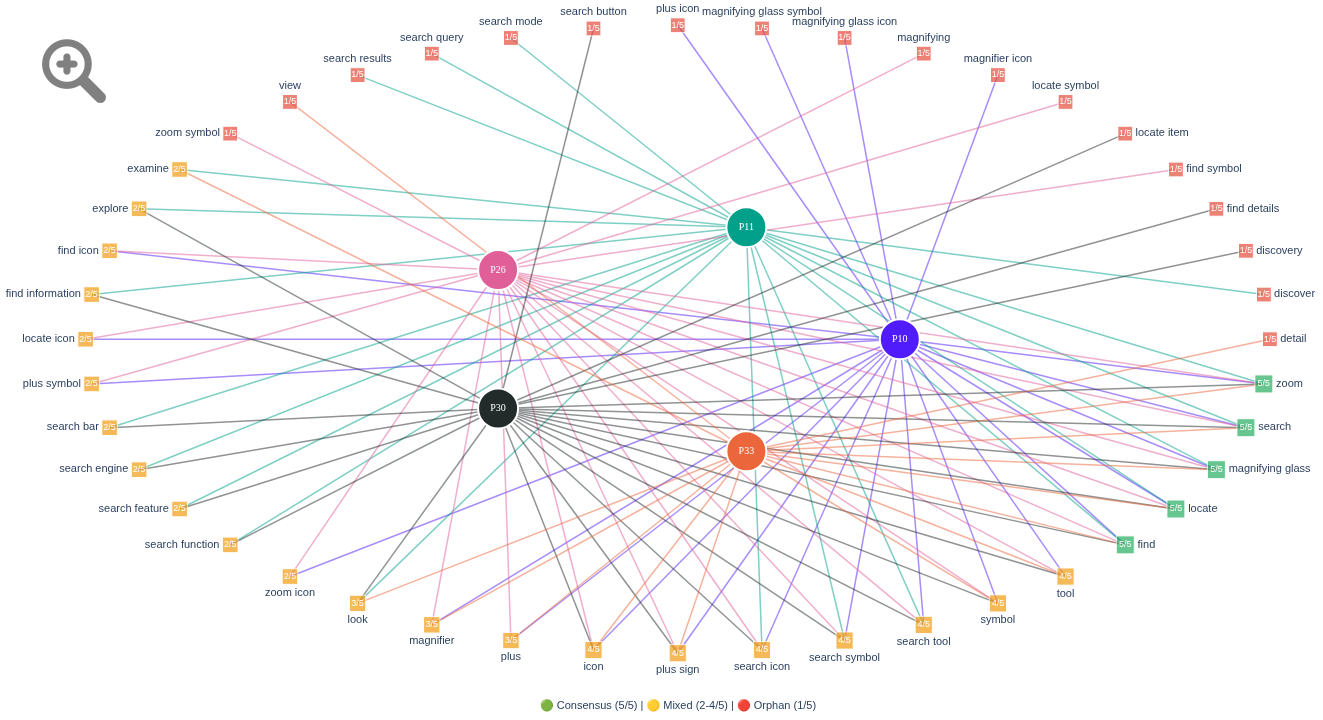
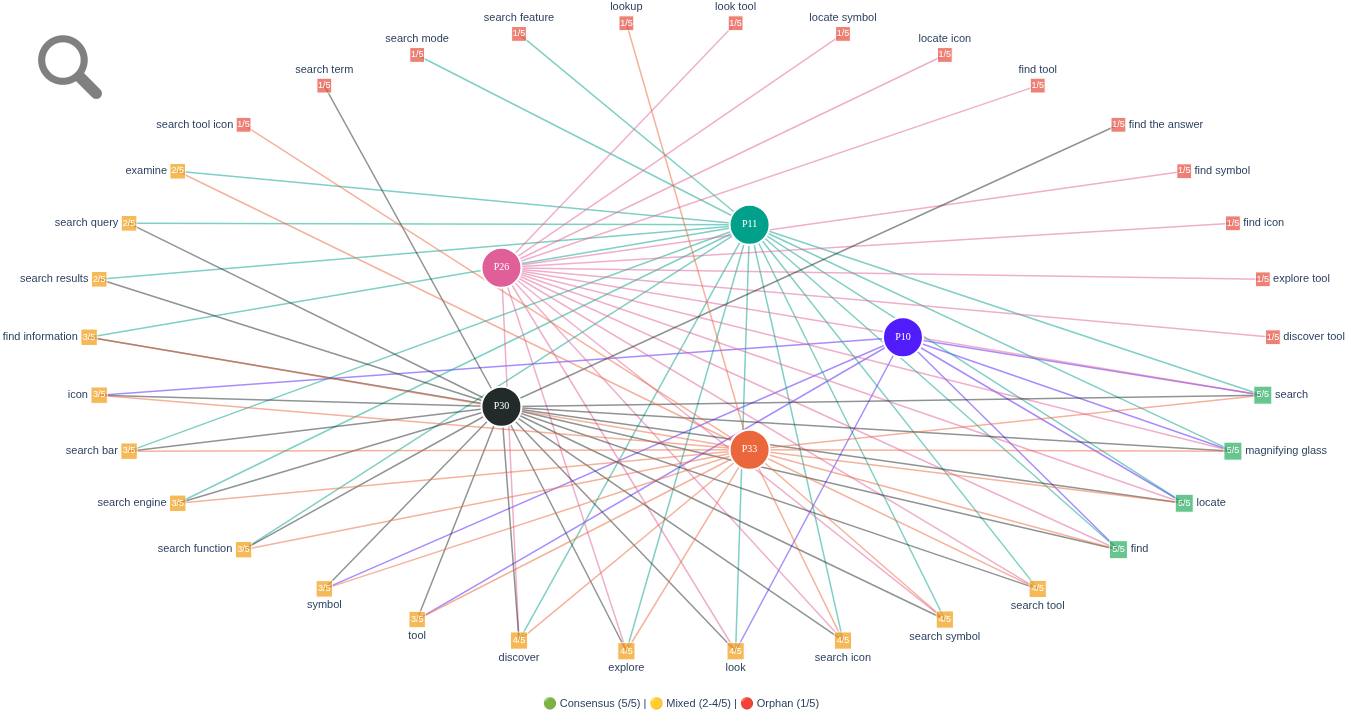
For the final labeling I was considering picking only the best prompt - P33. But doing this would still not give me the “zoom” label for the problematic icon, as this label was fifth in the answer for VLM. So I employed another strategy. I decided to use 5 best performing prompts and store the answers per prompt and image first. Then I selected the word that matched across prompts as the first candidate for icon name, and I did this for each icon. I knew that there would be some duplicates (two or more icons with the same label) and I wanted a specific label for each icon if possible.
To deal with duplicates I looked at all the matching words and if there was some word that was given only for one icon (all the other duplicated icons were not given this word), it was assigned as a label to the icon. If no such word existed, I decided to go back and look at the second match across prompts for each of the duplicated icons. This gave me a different label for the icon, which I assigned to it and the first matching word was assigned to the remaining icon.
If there were more than 2 duplicated icons, this process could take several iterations and in the worst case scenario I added to the icon names numerical suffix. This did not happen for my dataset of 2000 icons, so I got distinct names for each icon.
A simple developer frustration turned into an interesting experiment and helpful solution. If you have a larger file to tag or name, test it out yourself.
Source for reference icon: https://www.iconsdb.com/gray-icons/zoom-in-2-icon.html

Comments
Leave a Reply
Online comments are not active during the static migration phase.