Project Weaver: Automations That Don’t Turn Into Chaos

9 min read24.2.2026
When we talk about “AI-assisted development,” it’s easy to picture someone prompting a coding agent on their laptop and watching it produce a pull request. That workflow can already be useful. You get speed, you get momentum, and you can keep a human in the loop at every step.
But in Project Weaver, that’s not the end goal. That’s the starting point.
The goal of our Phase 2 work has been to take the good practices we’ve been writing about, and make them repeatable:
- Working from documentation and specs
- Using a feedback loop (tests, benchmarks, automated checks)
- Splitting work into planning and execution
- Implementing in phases, with review checkpoints
All of those can be done manually. And for many teams, doing them manually is already a big improvement.
The next step is automation: turning these practices into workflows that run reliably in the background, with fewer points where a human has to stop, context-switch, and babysit the process.
Automation, the practical version
There are two ways we’ve explored automating Weaver so far.
The first is the obvious one: use GitHub Actions.
GitHub Actions are event-driven workflows. They get triggered by things that already happen in your repo: an issue is created, a label is added, a pull request is opened, a branch is merged. Historically, we’ve used them for CI: run tests, run lint, build artifacts, deploy.
But Actions are also just compute. They run commands on a runner with access to your repository. That means one of those commands can be: run a coding agent.In practice, this is surprisingly powerful for very little work.
You can create an issue, add a label likeweaver:run, and trigger a workflow that:
- Runs an agent with a prepared prompt
- Gives it repo access
- Lets it make changes
- Commits the result
- Opens a pull request
- Comments back on the issue or PR
If you already live in GitHub, this feels natural. Your interface is no longer a terminal. It’s the GitHub UI. You review the PR, merge it, or leave a comment. And that comment can trigger the next run.
For small tasks, even something as simple as “review this PR and leave comments,” you can get useful automation quickly. If you’re already using Actions, we’d recommend trying this approach because the barrier is so low.
Where GitHub Actions start to break down
We built a proof of concept that reproduces the Weaver flow using GitHub Actions: planning, phase breakdown, implementation, and PR review.
It works.But it also runs into limitations pretty quickly. The biggest issue is that your workflow definitions live alongside your application code. That sounds fine until you hit edge cases:
- Which version of the workflow runs?Sometimes it’s pulled frommain. Sometimes from the pull request branch. That gets confusing, especially when you’re actively iterating on the workflows.
- Workflow definitions become part of the code surface area.You have to keep them in sync, protect them, and make sure the system doesn’t accidentally (or “helpfully”) rewrite them.
- It’s hard to decouple the automation engine from GitHub itself.If you want the same automation logic to run outside of GitHub events, or across systems, you start fighting the tool.
GitHub Actions are great. But at a certain point, we wanted something more deliberate: a workflow engine built for long-running processes, with clearer control over state.
The thing we really wanted: time travel
This is the core idea behind how we think about automating Weaver.
You’ll see a lot of discussion right now about “swarms of agents” working in parallel for days or weeks. The demos are impressive. But for most real teams, there are two practical problems:
- Cost: running many agents continuously adds up fast.
- Oversight: when too much happens in parallel, it becomes difficult to steer.
Even with strong feedback loops, you’re often steering at 10,000 feet: big goals, large batches of work, and a lot of hope that it converges into something clean.
And the other problem is repeatability. If you run the same high-level task twice, you can end up with two very different results. If you liked something about run #1, it’s hard to reliably reproduce it in run #2.
So we started thinking about unpredictability differently.Instead of treating it as a flaw, you can treat it as a search space. But only if you can branch.
That’s what we mean by “time travel.” If you’ve used modern chat tools, you’ve seen this pattern already: go back to a previous message, adjust the prompt, and try again from that point. You’re not forcing the system forward from a bad turn. You’re branching before it goes wrong.
For code generation, this idea is much more valuable, and also much harder.
Because the “state” isn’t just the conversation. It’s also:
- the code at that moment
- the database state
- the file system
- whatever processes are running
- and any other environment context the agent depends on
If you can snapshot that state, and restore it reliably, you get something powerful:
You can let the agent run all the way to the end without blocking on human review. Then you can evaluate the result, identify where it went wrong, and branch from a clean checkpoint. This is not just “undo.” It’s controlled exploration.
Why Temporal became our automation engine
This is where the second approach comes in. Instead of building everything inside GitHub Actions, we built a workflow engine using Temporal.
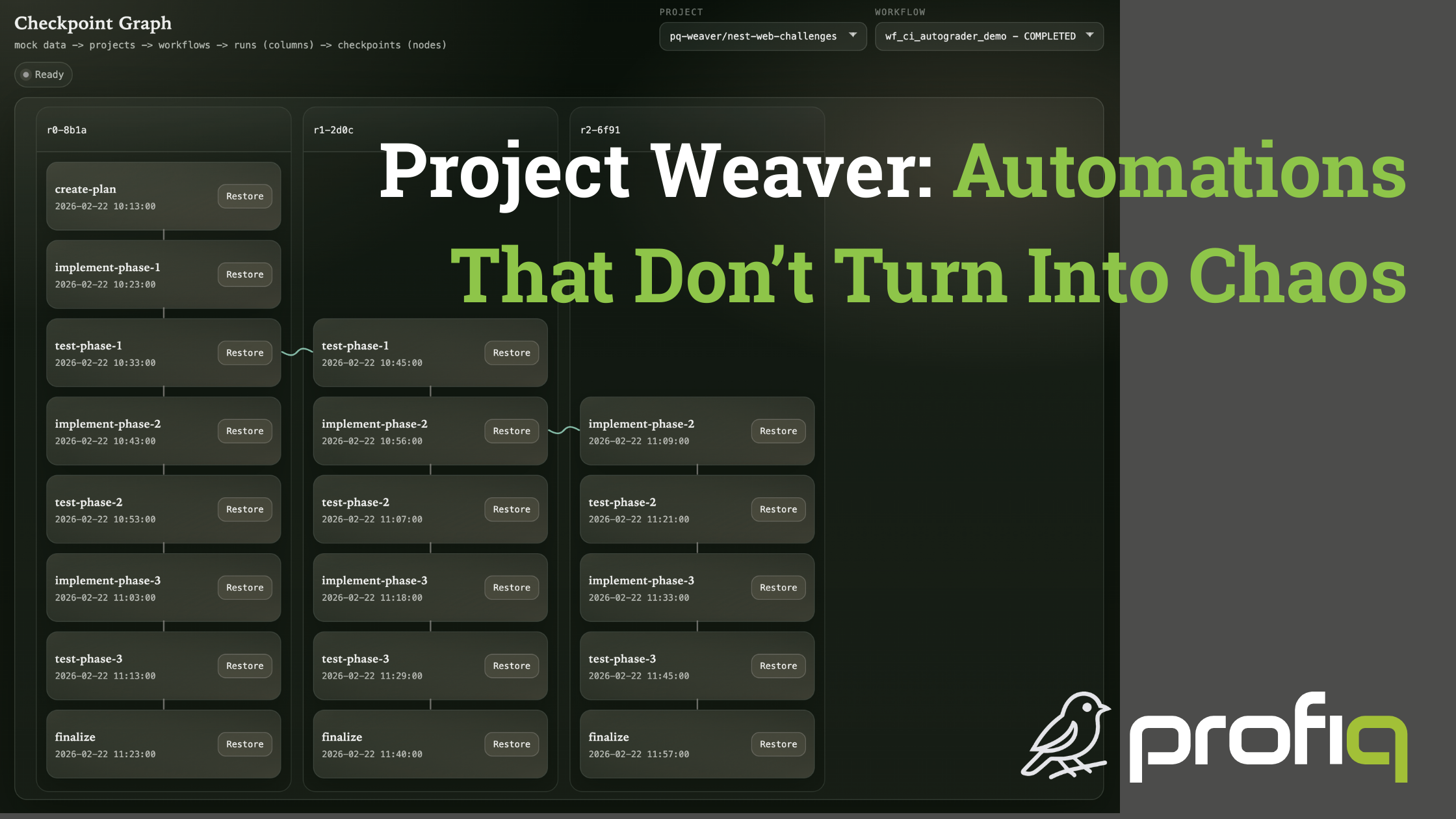
Temporal is designed for long-running workflows. It keeps a durable history of what happened and provides primitives that make “replay” and recovery possible. In a sense, it gives you time travel for free at the workflow level.
Not completely free. We still had to do real work to make “time travel” meaningful for an agent:
- reverting code changes
- resetting the environment
- making sure the world looks like it did at the checkpoint
- ensuring the agent can continue from that point as if nothing happened
But the key point is: the Temporal-based engine is now working, and it’s on par with what we had in GitHub Actions. We can encode workflows like:
- create an implementation plan
- parse the phases
- iterate phase-by-phase
- implement, test, and review
- open PRs for human feedback
And now we can add checkpoints inside those workflows. That means we can “jump back” not just to the previous message in a prompt thread, but to an earlier point in the entire workflow. If the agent generated a six-phase plan and implemented all six phases, and we discover the root issue was introduced in phase one, we can go back before phase one and rerun cleanly.
This is a big difference between conversation-level undo and workflow-level time travel.
A subtle but important benefit: you’re no longer the bottleneck
This part surprised me a little. When you work with a coding agent interactively, you tend to stop it frequently for review. That gives you control, but it also makes you the bottleneck. The agent is waiting on you to approve the next step.
With workflow-level time travel, you can let the agent run. Even if it makes mistakes, that run still produces information:
- where it failed
- what assumptions were wrong
- which library choice caused trouble
- what tests failed and why
- what changed compared to the spec
Then you can decide: do we patch forward, or do we rewind and fix the root cause? In my experience, patching forward often leaves “history scars”:
- specs drift from reality
- documentation goes stale
- fixes accumulate in a way that makes the codebase less clean
If you can rewind, update the spec or instructions at the moment the mistake was introduced, and rerun, you get a cleaner history. It’s closer to “we did the right thing from the start,” even if that took two attempts.
That’s a meaningful quality improvement, not just a developer convenience.
What’s next: teaching the agent to summarize dead ends
Right now, the decision of when to time travel and what to change is mostly manual. The developer reviews the result, identifies the bad checkpoint, and adjusts the spec, prompt, or documentation.
But there’s an automation step we’re actively experimenting with: When a branch ends poorly, have the agent summarize the path. Not a vague summary. A useful one:
- what we tried
- what failed
- what decision caused the failure
- what to avoid next time
- what should change in the spec or prompt
This is promising because it reduces the burden on the human to write “lessons learned” instructions from scratch. It turns dead ends into structured feedback, and makes branching more productive.
It’s still early. Tools like Cloud Code introduced similar ideas recently, and we’re testing how well this works at the workflow level (not just in a single prompt thread). I’m optimistic, but I don’t want to claim it’s solved until it’s solid.
Beyond that: branching enables evaluation
Once you have reliable checkpoints, you unlock another capability: repeatability. At a checkpoint, you can run the same step with different models, or different agent strategies, and compare outcomes.
That opens up practical experiments:
- How different is the result if we use a cheaper model on certain steps?
- When do we actually need the premium model?
- Can we run an “ABC test” across models at the same checkpoint?
- Can multiple model outputs serve as an evaluation baseline, so scoring is relative instead of absolute?
This is still more conceptual in Weaver today. The plumbing is there, but we’re not fully automating these experiments yet. But it’s an example of why time travel is more than a neat trick. It turns AI development from a single unpredictable run into something closer to a controlled process.
Closing thought
Automation is not the goal by itself. The goal is to take the workflows that produce clean, maintainable software, and make them easier to run consistently. Automation is how we reduce the number of times a human has to interrupt the process, without losing control of quality.
GitHub Actions are a great starting point. They can get you a lot of value quickly.
But for Weaver, the most important piece is workflow-level time travel: the ability to let the agent run, review outcomes, and branch cleanly from known-good checkpoints.
That’s the difference between automation that accelerates your work, and automation that creates a mess faster.
We’d love to get your perspective on what you’re experiencing and how you’re approaching automations. Reach out here on LinkedIn or set up a call to talk about it.
Comments
Leave a Reply
Online comments are not active during the static migration phase.