Documentation - the Next Priority in AI-Assisted Development

8 min read27.1.2026
In our last blog article, we talked about Workflow Planning as the most important step in reminded, reliable AI-assisted software delivery. Planning creates alignment, reduces rework, and gives both humans and agents a shared map of what “done” actually means.
But once planning is solid, the next priority is:
Documentation.
Not as a nice-to-have. Not as a compliance checkbox. As a practical way to make coding agents more accurate, more consistent, and far less likely to drift into outdated assumptions.
This post explains why documentation matters so much for AI coding workflows, what tends to go wrong with common “just search the web” approaches, and why Weaver treats documentation as a first-class citizen inside the repository.
Why documentation matters more with AI than without it
Most teams already know documentation is important. What changes with AI is the failure mode.
A human engineer who is unsure can pause, search broadly, spot inconsistencies, and reason about tradeoffs. An AI agent can do some of that, but it is also prone to confident errors when its inputs are incomplete or outdated.
The core problem is simple:
LLMs are trained on data that is always meaningfully outdated
Even if a model’s training cutoff is “only” a few months back, that is still enough time for a fast-moving library, framework, or platform to change in ways that matter.
And there is a second issue that shows up constantly in real projects:
New versions and niche libraries are underrepresented in training data
Even if a library exists publicly, a brand-new major version can be “real” but still not show up enough in the model’s learned patterns to be reliable. The model may default to older APIs, older conventions, or older patterns that look plausible but do not match the version you are actually using.
That is why Weaver leans on a strategy that reliably works with modern language models:
In-context learning: give the agent the exact information it needs, at the moment it needs it In practice, in-context learning just means: the agent can only be as good as the material you put in front of it.
So instead of hoping the agent “already knows” your stack, your versions, and your team conventions, you provide the canonical source of truth as part of the project context.
Why “web search + summarization” is not enough
Many coding agents now offer built-in web search or web fetch capabilities. This helps, and it often produces decent results. But it comes with a major tradeoff.
Summarization steps can silently remove the exact detail you need
To avoid overwhelming the context window, most tools do not pass the full raw documentation into the agent. They retrieve it, then run it through an additional model or compression step.
That means the agent often receives:
- A shortened summary
- A cleaned-up extraction
- A reformatted “answer”
The problem is that if your question is specific, the summarization step may clip the one line that matters. The original documentation might contain the correct answer, but it never reaches the agent.
Some tooling has the opposite failure mode: too much data
Other documentation tools and MCP-style servers can dump huge volumes of content into the context window. That can overwhelm the agent, dilute focus, and reduce output quality.
In short, you get two common failure modes:
- Too little signal (important details removed)
- Too much noise (agent loses the thread)
Weaver’s perspective is that documentation should not be a blurry, summarized artifact that the agent receives through a chain of LLM transformations.
It should be something you own and control.
Weaver’s approach: make documentation a first-class citizen in the repo
The simplest thing that works is often the best thing that scales.
Weaver’s approach is intentionally straightforward:
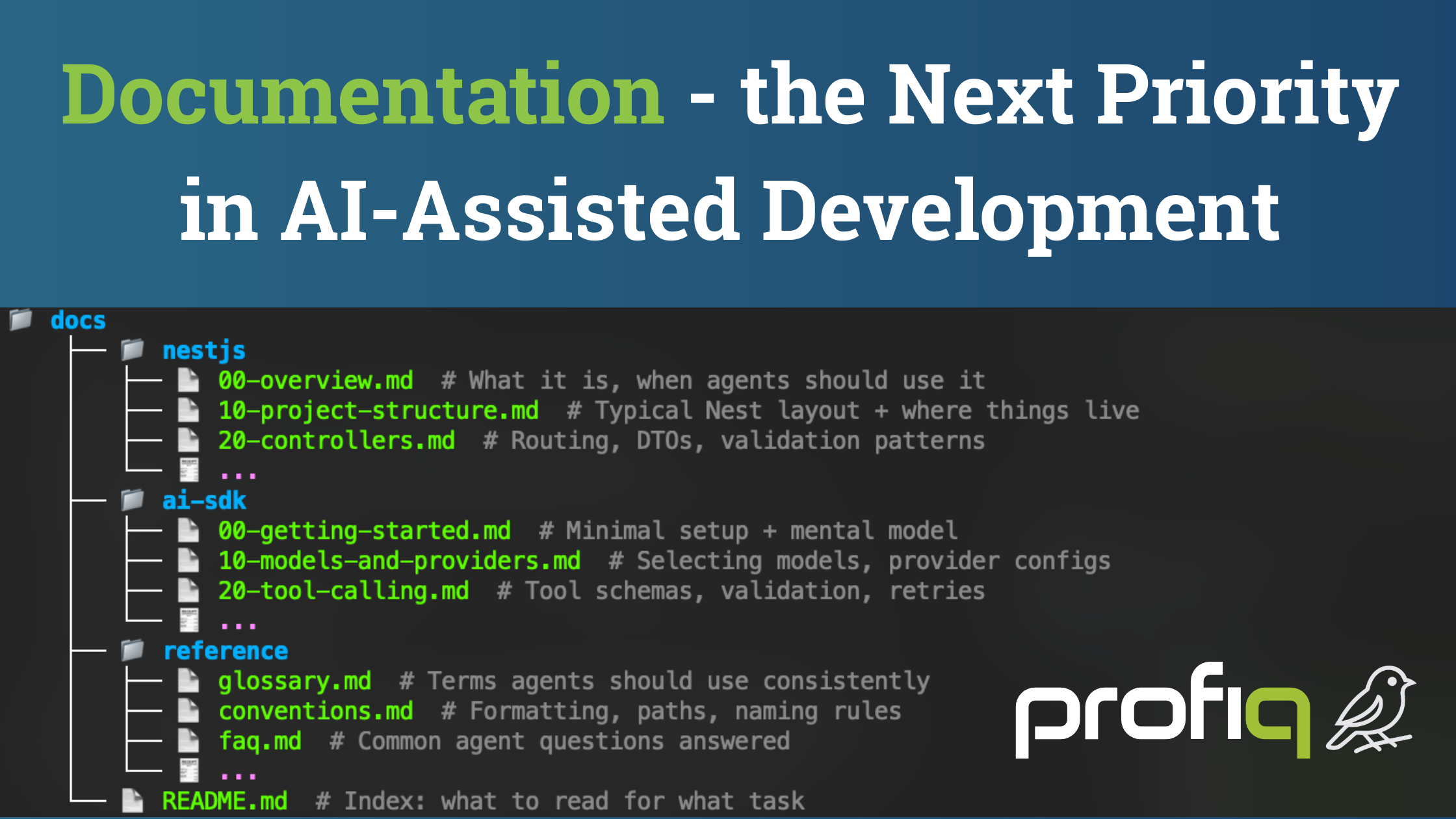
Put the documentation***in the repository*****, as Markdown, inside a docs folder**
Instead of relying on external fetch tools, Weaver encourages creating a structure like:
- docs/-library-a/-library-b/-platform-c/-your-internal-guides/ (optional, later)
Each folder contains Markdown files that mirror the key parts of official documentation you actually rely on.
This may sound manual, but it consistently delivers outsized value because:
Coding agents are already great at file systems
Agents are trained to:
- List directories
- Open files
- Read and reference content
- Cross-check across a project
When documentation is presented like the rest of the codebase, the agent interacts with it naturally.
No special “documentation tool” required.
The real win: you can shape documentation to your project, your conventions, and your constraints
When documentation lives inside your project, it stops being generic.
It becomes part of the engineering system.
That unlocks a few powerful advantages:
1) Keep what you use, remove what you do not
If a library has five approaches and your project always uses one, you can prune the rest. That reduces confusion and prevents the agent from “helpfully” picking an option your team never uses.
2) Align examples with your coding style
You can rewrite or annotate examples so they match:
- Your architecture conventions
- Your naming patterns
- Your preferred approach to configuration, error handling, and structure
3) Keep documentation and code evolving together
Docs become an artifact that changes as the project changes. That is especially valuable as AI agents participate in implementation, because the documentation stays anchored to the reality of the repository.
How Weaver makes docs discoverable for the agent
Putting files indocs/is step one.
Step two is making sure the agent knows to look there.
In Weaver, this shows up as a simple rule in the agent guidance file (for example: AGENTS.md or CLAUDE.md):
- When you need to learn or confirm how to use a library, look indocs/first.
- Use the project’s documentation as the source of truth.
That tiny instruction matters because it reliably changes agent behavior from:“I will guess based on training data.”to:“I will open the documentation folder and confirm the correct usage.”
How documentation amplifies planning
Planning is the foundation. Documentation is the accelerator.
When documentation is available during planning, the agent can:
- Reference the correct APIs and patterns while proposing phases
- Link to specific docs files as the source of truth
- Include relevant snippets in the implementation plan
This creates shared context across the workflow:
- The planning agent can cite the docs it used
- The implementation agent can open the same files
- Humans can review the plan with confidence that it is grounded in your actual stack
Do you have to do documentation before planning?
Priority-wise, planning comes first.
Sequence-wise, documentation often comes before planning, but it does not have to.
A practical workflow looks like this:
- Start with planning and see how far you get
- If the agent struggles with a library or drifts into outdated usage:
- Add the relevant docs todocs/
- Rerun planning or continue implementation with the stronger context
Because planning and implementation are now cheaper to rerun than traditional rework, adding documentation mid-stream can be an efficient upgrade rather than a blocker.
Scaling documentation across projects
If you build multiple products on a similar stack, you do not want to repeat this work every time.
A scalable approach is:
- Maintain a centralized documentation repository for your standard libraries
- Pull the relevant docs into each new project at the start (or when needed)
This is especially effective when your stack is intentionally constrained, which is exactly how Weaver is being designed: fewer libraries, more depth, more reliability.
“Skills” are another portable way to package
That makes this approach portable across tools.
Weaver can orchestrate one agent today, but the documentation artifact remains usable across ecosystems because it is just Markdown and files.
Documentation is how you turn AI from “helpful” into “reliable”
AI-assisted development becomes truly effective when the agent is grounded in:
- A clear plan
- A clear, project-owned source of truth for the stack it must use
That is why, after planning, documentation is the next highest priority.
Not because it is trendy, but because it is practical.
It reduces drift, prevents outdated patterns, and improves consistency across implementation phases.
What’s next After planning and documentation, the next major pillar is the feedback loop: how you verify agent work, roll back safely, and continuously improve outcomes without turning AI into a fragile, high-maintenance system.
We will cover that next.
Comments
Leave a Reply
Online comments are not active during the static migration phase.